A therapist who taps Save and sees "Saved" closes the app and walks into the next session. That word is a promise. It says the note is on record: the supervisor can sign off on it, the office can bill it, and it will still be there if the phone is dropped in a parking lot tonight.
This fall we went through the places in the app on your phone or tablet where you save your clinical work, and made each one tell the truth about where your work is. Below is what each message means now and what to do when you see it.
What "Saved" used to mean on the phone
Until late October, the phone app waited a moment for our server to confirm a save, then showed "Saved" whether or not the confirmation had arrived. On a good connection that made no difference. On a weak one, the change could still be sitting on the phone, waiting to go. The app kept trying and the change usually arrived, but "usually" isn't what the word promises. If the server turned a save down after that moment had passed, nothing told you.
Version 1.9.39 (October 28) fixed that, and the November update (1.9.42) did the same for signatures.
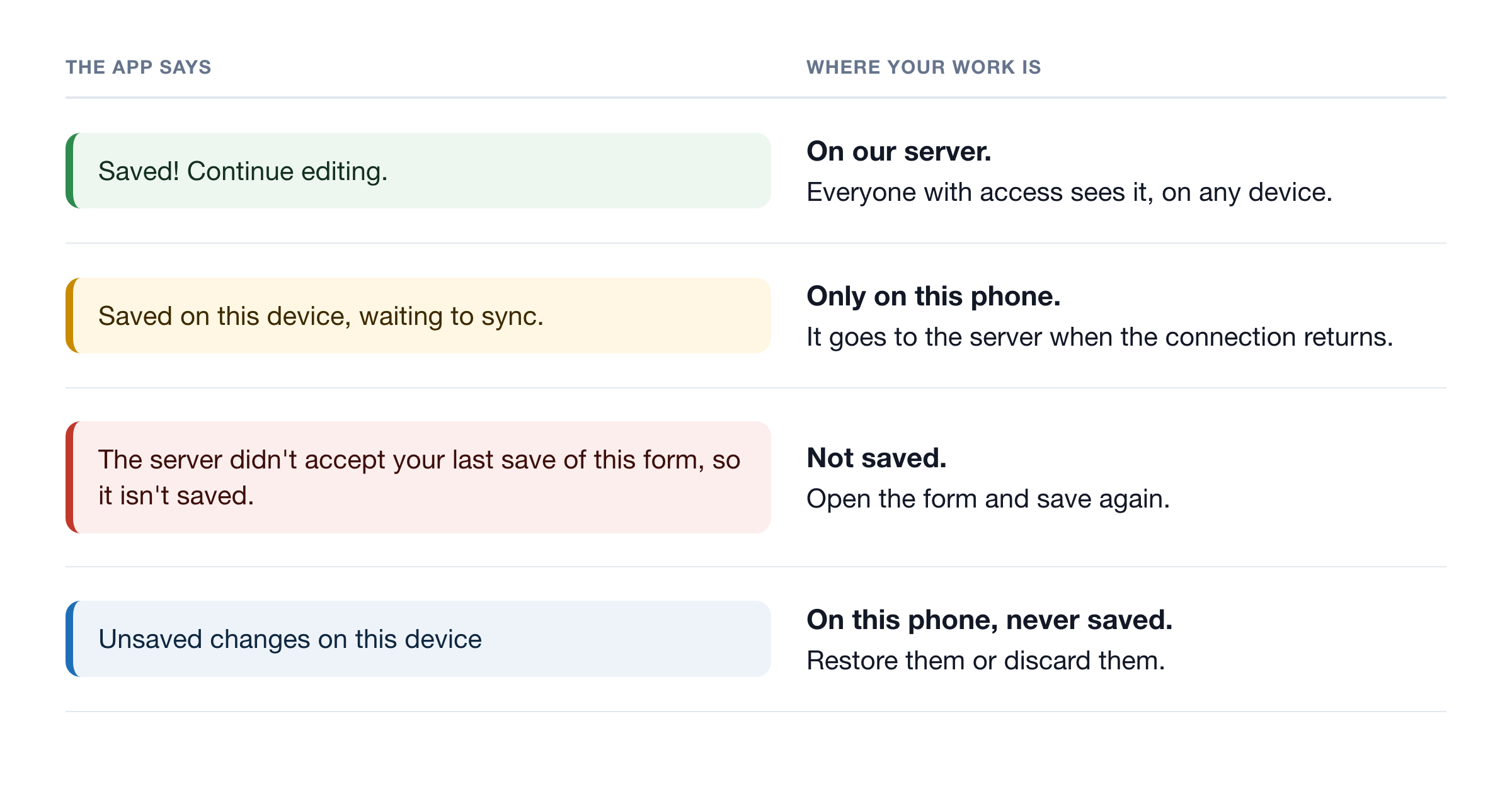
What each message means now
- "Saved! Continue editing." means our server confirmed it. Anyone with access sees it on any device.
- "Saved on this device, waiting to sync." means it's on this phone and hasn't reached us yet. The app holds it on the phone and sends it when your connection comes back. Until then, don't pick the work up on another device.
- "The server didn't accept your last save of this form, so it isn't saved." means what it says. Open the form and save again. This used to be silent.
- "Unsaved changes on this device" appears when you reopen a form you edited but never saved, for example because the app closed. The phone kept your edits, and you choose Restore or Discard. A new form you started and never saved comes back as "Unfinished form on this device", with Pick up or Start blank.
A signature counts once it's saved
Drawing on the signature pad used to look like signing. It wasn't, until the save went through. Since 1.9.42, in the app on your phone or tablet, the card under the pad says "Not signed yet. Tap Sign to save your signature." until you tap Sign, then "Saving your signature." while it goes. If it can't be saved, you'll see "Couldn't save your signature. Check your connection and tap Sign again." Your drawing stays on the pad while the page is open, so you can try again without redrawing. Signing a saved log needs a connection, because a signature that exists on one phone only isn't one anybody else can rely on.
The web app works differently, on purpose
On the web app, a form you're editing is saved for you about 30 seconds after your last change, so there is less to lose if a browser tab closes. The phone is the device people carry into homes, schools and clinics where the signal comes and goes, so it does two things instead: it keeps your unsaved edits on the device and offers them back, and it tells you plainly when a save hasn't reached us yet.
Why one word matters this much
A clinical record is read by people who weren't in the room: the supervisor who reviews it, the administrator who approves, the person who bills, and sometimes an auditor a year later. Every one of them sees what our server has, not what is on your phone. When the app says "Saved", it's telling you those people will see your work. When it can't say that yet, it now says so, which gives you the chance to fix it while the session is fresh.
What to do: keep the app updated when your phone offers it. If you see "waiting to sync", get back online before you switch devices. Every change is listed in plain language on What's new.
We build EMRFlow for clinicians who document between sessions, often on a phone and often on the move. Structured, AI-assisted clinical documentation only helps if the note you finished is the note on record.