Stock OpenEMR has no way for a user to change or reset their own password without being logged in. When a therapist forgets theirs, an administrator resets it by hand. For a small agency that means the admin becomes the help desk, usually first thing Monday.
We built a fix for our own hosted instances and released it as a free package: emrflow-openemr-password-reset (opens in new tab), GPL-3.0, the same license as OpenEMR itself.
What it adds
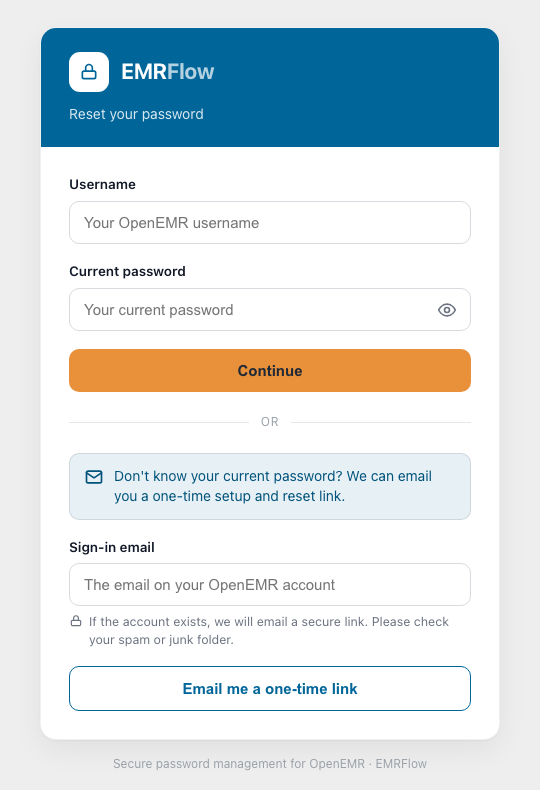
A public page at change_password.php with two flows:
- Password change. The user knows the current password and wants a new one. Username plus current password, verify, set the new one.
- Email-link reset. The user forgot the password, or it's a first login. Enter the email on file, receive a one-time link, click it, set the password. The email address is the identity proof, so it can't be changed in that same flow.
What it doesn't touch
Nothing in OpenEMR itself. The package is three files that sit beside the core: the public page, its processor, and one library include. Extract them into public_html and the page is live. No config edits, no migrations. The four tables it needs (reset tokens, a password baseline, per-user status, and a verification log for rate limiting) are created on first use.
Tested on OpenEMR 7.0.2 Patch 3 and 8.0.0 Patch 3, and verified against the 8.1 development build. The email-link flow needs OpenEMR's own SMTP settings filled in under Admin, Config, Notifications; without them, the username-and-current-password flow still works and the link flow simply won't send.
The security posture
Because this page is reachable without a login, it was built to be the most careful page on the server:
- Password policy: at least 8 characters with upper, lower, digit and special characters; no reuse of the current password or the last four.
- Reset tokens are single-use and stored only as SHA-256 hashes. The plaintext token is never persisted.
- CSRF protection on every form, rate limiting on token verification, HttpOnly session cookies, same-origin framing, a strict referrer policy.
- Every verification attempt is logged to its own table, which doubles as an audit trail.
Make it yours
The page ships EMRFlow-branded, but branding is one config block at the top of the file: a name, a tagline, one accent color (the page derives the rest), a button color, and an optional logo path. Set the name to your organization's and it's your page.
One flag worth knowing: the email field on the change flow ships locked, because our own systems key downstream records on that address. If your OpenEMR has no downstream systems keyed on google_signin_email, flipping $lockEmail to false lets users update their email in the same step.
Why give it away
Because the admin-as-help-desk problem isn't a competitive advantage for anyone. Every OpenEMR site has it. Fixing it costs an afternoon, and we'd rather every practice on OpenEMR had that afternoon back. If you run OpenEMR and want structured, AI-assisted documentation on top of it, that's what EMRFlow is for. The password page is useful whether or not you ever need us.
Install it: back up public_html, extract the package into it, and open /change_password.php. The README on GitHub has the full steps, the email setup, and the white-label block.