The complaint arrives as "opening a patient takes forever." The clinical tables are small and indexed; document queries return in milliseconds. What's slow is the audit machinery wrapped around every request. This is the procedure we now run quarterly on every OpenEMR instance we host, and the measurements behind it.
The root cause, measured
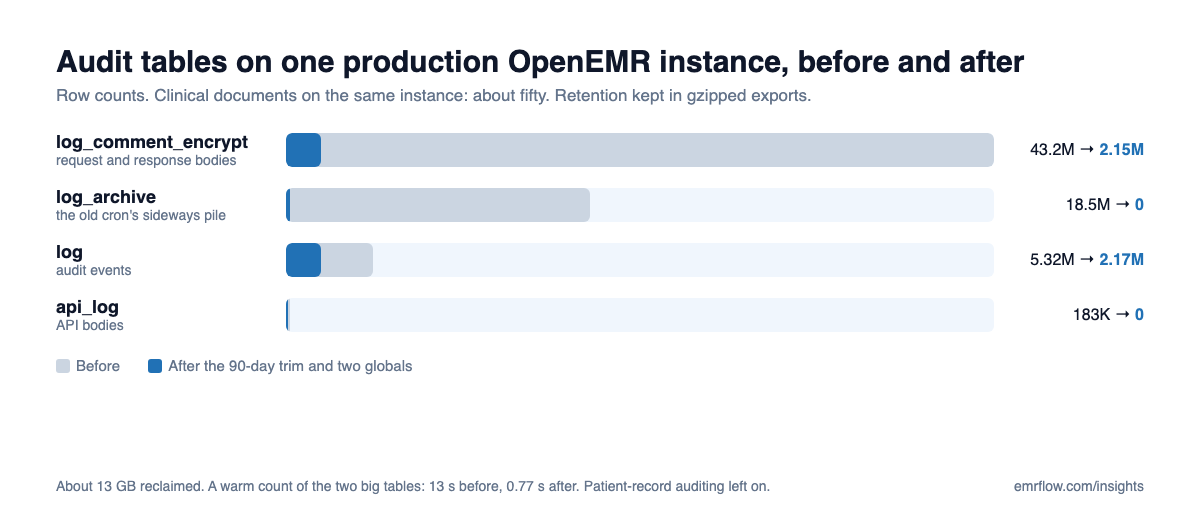
OpenEMR audits every request. With audit_events_query on and api_log_option set to log full request and response bodies, each audit row can carry around 22 KB, and the audit tables outgrow the clinical data by orders of magnitude. On one production instance we measured roughly 13 GB of audit rows against about fifty clinical documents. The log_comment_encrypt table alone held over 43 million rows, most of them our own integration's API polling being audited for months.
The second half of the problem was the database itself: the stock 128 MB InnoDB buffer pool and innodb_flush_log_at_trx_commit=1, on a server with most of its memory idle. A single count of the two big audit tables took over 13 seconds. After maintenance it takes under a second.
What stays on
Before touching anything: enable_auditlog and patient-record auditing stay on. Knowing who opened which chart is part of a HIPAA-aligned posture, and nothing below weakens it. What changes is how much noise gets written around that signal.
The procedure
- Export first.
mysqldump --single-transaction --quickoflog,log_archive,log_comment_encryptandapi_log, gzipped to a directory outside the web root with mode 700, thengzip -tto verify. These dumps are the retention record. The obligation to retain audit history does not require the rows to stay in the live database. - Swap the log table by renaming, not copying.
RENAME TABLE log TO log_old; CREATE TABLE log LIKE log_old;is instant, and writers resume on the empty table immediately. Then backfill the last 90 days from the offline copy. - Swap
log_comment_encryptthe same way. Add an index onlog_idto the offline copy first, then backfill the rows that join to the retained log ids. - Truncate
log_archiveandapi_log, then drop the_oldtables. - Change two globals.
audit_events_query=0stops auditing query events;api_log_option=1logs API requests without response bodies. Leave everything about patient-record auditing alone. - Verify. Probe the login page and the FHIR discovery endpoint on a 15-second cadence during and after the run, and record row counts before and after.
The mistake that caused a 25-minute outage. Our first run copied rows with INSERT INTO new SELECT before swapping tables. The copy held shared locks on the audit tables, OpenEMR writes an audit row on every request, and every request queued behind the copy. Rename first. It reduces the impact to seconds, and it's the reason step 2 is worded the way it is.
Then tune the server
With the tables trimmed, size the buffer pool to the machine: we use 4 GB on a 15 GB host and 1 GB on an 8 GB host, with innodb_flush_log_at_trx_commit=2. That's one brief database restart. Check headroom before choosing the number.
What the old cron didn't do
If your instance still runs the legacy cron-trim-log-table.php, know what it does: it moves log rows older than six months into log_archive and deletes them from log. It never trims the archive, the comment table, or the API log. It shuffles the bloat sideways. On one instance it built an 18.5 million row archive over time. The procedure above supersedes it.
Cadence
The two globals cut new growth drastically, so the trim is a quarterly job, or whenever log passes about 1 GB again.
If you'd rather not run this yourself, this maintenance is part of how EMRFlow hosts OpenEMR for the agencies we work with: provisioning-time tuning and the quarterly rotation, with the export as the retention record.
Start today: run SELECT COUNT(*) FROM log_comment_encrypt; on your instance and time it. If it takes seconds rather than milliseconds, do step 1 (the export) this week and put the trim on the calendar. The next time someone says opening a patient takes forever, you'll already know which tables to look at.